News
The news feature lets you publish updates for athletes and box members directly on your website and in the app.
Overview
The news feature in the box management allows you to keep athletes and box members informed about updates regarding your CrossFit box. Published news items appear on both your website and in the app, and can include a photo, a title and a detailed text.
Typical use cases include new WODs, competition announcements, coach introductions or box events.
Creating and Managing News
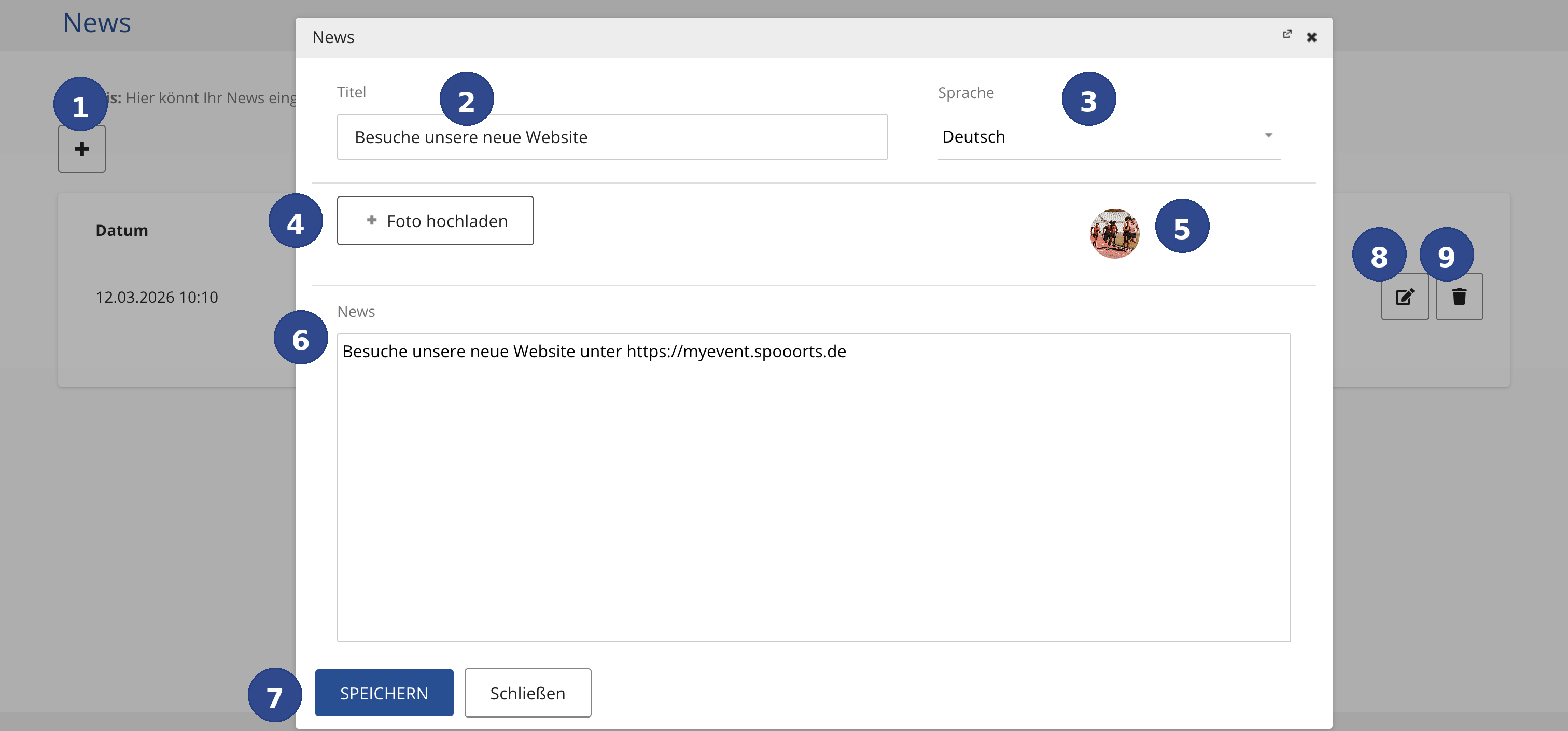
- ① Create New News
- Click the + button to create a new news item. The news editor opens as a dialog.
- ② Title
- Enter the title of your news item here. The title is displayed as a heading on the website and in the app. Choose a short, descriptive title that catches the attention of your athletes and box members.
- ③ Language
- Select the language of the news item from the dropdown menu. You can publish news in different languages to reach an international audience. Each language version is managed separately.
- ④ Upload Photo
- Click + Foto hochladen to add an image to your news. Photos make your news more visually appealing and increase engagement. Common image formats (JPG, PNG) are supported.
- ⑤ News Image
- The uploaded photo is shown as a round preview. The image will appear on your website and in the app alongside the news text.
- ⑥ News Text
- Write the full text of your news item here. You can include links, e.g. to your website or registration page. The text is displayed in full on the website and in the app.
- ⑦ Save
- Click SPEICHERN (Save) to publish the news item. The news will immediately appear on your website and in the app. Click Schließen (Close) to discard your changes.
- ⑧ Edit
- Use the edit icon to modify an existing news item – for example, to update the text or add a new photo.
- ⑨ Delete
- Use the delete icon to permanently remove a news item from your website and from the app.
Tips for Great News
To make your news resonate with athletes and box members, keep these tips in mind:
- Use descriptive titles that spark curiosity.
- Always include a photo – news with images receives significantly more attention.
- Keep the text concise and informative. Link to additional pages when needed.
- Publish news regularly to keep athletes and box members up to date.
- Use the multilingual feature if you have an international audience.